Real Weather
- 3.8
- Rating
- 1.00M
- Installs
- Free
- Price

 Analysis by App-foxy
I like weather apps that let me answer a simple question quickly: what should I expect outside, and can I trust the answer enough to plan around it? Real Weather takes that straightforward role and gives it a more visual presentation than many basic forecast tools. After spending time with it, I see it as a free weather app for people who want local conditions to feel easy to read without turning the screen into a wall of technical information.
It is developed by ruivop and sits in the weather category, with a store summary focused on accurate, reliable, local forecasts and a visually polished experience. That description is a useful starting point, but it does not tell you whether the app feels practical during a rushed morning, whether it remains comfortable during repeated checking, or whether it is a good replacement for the weather tools already on your phone. Those are the questions that matter in daily use.
My overall impression is that Real Weather is most convincing when you want a quick visual read rather than a deeply technical forecasting workstation. It is easy to approach, free to download, rated for Everyone, and available for devices running Android 7.0 or later. The current release is version 3.0.2, while optional in-app purchases range from $0.99 to $9.99 per item. That makes it accessible, although anyone who wants a completely purchase-free experience should pay attention to which extras are optional before settling into long-term use.
You May Also Like

 Blood Strike: 2.5 Anniversary
Blood Strike’s Loadouts Turn Every Drop Into a Tactical Gamble
A close look at Blood Strike’s custom loadouts: how fast access to signature weapons reshapes its battle royale rhythm, rewards preparation, and narrows the gap between fights.

 Pandora - Music & Podcasts
Pandora’s Music Is Easy to Start, but Harder to Recover
Pandora’s strength is its low-effort path from a seed to a station. Its weak spot is how much confidence it asks you to place in connection, setup, and quiet recovery.

 8 Ball Pool
 Is Built on Rivalries, Rematches, and Routine
A close look at the rivalries, rematches, shared routines, and unanswered safety questions that turn a quick pool match into a persistent mobile community.

 Samsung Music
’s Quiet Strength Is Playing What You Already Own
Its reach comes less from spectacle than from dependable access to a personal library. That simplicity is both the app’s strongest retention engine and its ceiling.

 AccuWeather: Weather Radar
AccuWeather Review: A Quick, Clear Forecast for Everyday Decisions
For everyday plans, the best forecast is the one you can understand quickly. AccuWeather makes rain timing, radar, and local conditions easy to act on, with a few trade-offs.

 Hill Climb Racing
Why Hill Climb Racing Still Turns Crashes Into One More Run
A tiny car, a bumpy hill and one more upgrade: Hill Climb Racing keeps resurfacing because its simple chaos makes every near-miss feel personal.
More From Our News Desk



How Real Weather feels during a quick check
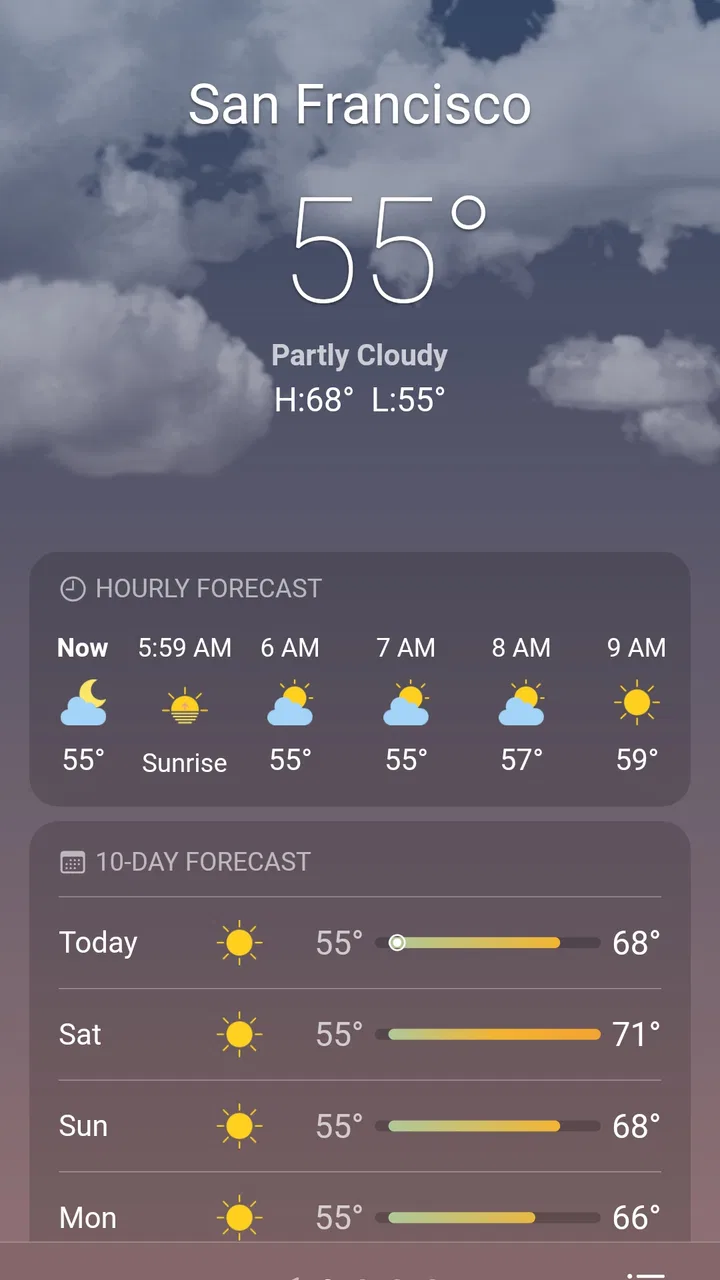
The first thing I notice with a weather app is not the number of panels it offers but how quickly I can understand the current situation. Real Weather is designed around that kind of glance. Its visual approach helps separate the important information from the background, so I do not feel as though I need to study a chart before deciding whether to take a jacket or change a short walk into an indoor errand.
That visual emphasis is especially useful on busy mornings. I can open the app, identify the local conditions, and move on without treating the forecast like a research project. For someone who checks the weather several times a day, that lower mental effort matters. A forecast can be technically detailed and still be inconvenient if the key information is buried beneath decorative cards or dense wording.
There is also a trade-off here. People who enjoy comparing several forecast models, examining highly granular atmospheric information, or building plans around specialist weather data may find a visually focused app less satisfying than a dedicated meteorological tool. Real Weather feels better suited to ordinary decisions: commuting, walking, choosing clothes, timing an outdoor appointment, or deciding whether a weekend plan needs a backup.
I would not judge its speed only by how quickly the opening screen appears. Weather apps depend on retrieving current information, and the experience can vary with the connection and the phone itself. What I can say is that the app’s design aims for a quick answer rather than a long sequence of interactions. That makes it feel responsive in the situations where I use weather information most often, even though a poor connection can still affect any forecast service.
Useful in the small moments that add up
A realistic example is leaving home for work while trying to keep a phone, keys, and coffee under control. I do not need a long explanation at that moment. I need to know whether the conditions are comfortable, whether the day is likely to change, and whether an outdoor route deserves reconsideration. Real Weather’s local and visual presentation fits that decision better than an app that opens on a complicated radar view every time.
Another practical use is checking before a short trip across town. Instead of looking only at the current condition, I can use the forecast as a prompt to think about the return journey as well. This is a small habit, but it avoids the common mistake of dressing for the moment and ignoring what the weather may be like a few hours later.
For parents, walkers, cyclists, and anyone who works outside, the value is less about entertainment and more about reducing avoidable surprises. I would still treat the forecast as guidance rather than a guarantee, especially when plans depend on exact timing. The app can support a decision, but it should not replace common sense in rapidly changing conditions.
What happens when I use it repeatedly
Heavy use for a weather app usually means repeated short sessions rather than one long session. I might check before leaving, again before lunch, and once more before heading home. Real Weather makes sense in that pattern because its purpose is immediate orientation. It is not an app I would open for hours, and it does not need to be. The important question is whether those repeated checks remain clear instead of becoming tiring.
The visual style can make frequent checking pleasant, but visual richness always deserves a little scrutiny. A screen that looks attractive may also use more animation, imagery, or layered presentation than a very plain weather utility. Without inventing a battery measurement or claiming a specific memory footprint, my practical advice is to treat Real Weather as a normal app to observe during your own routine. If your device is older, notice whether transitions feel comfortable and whether the app remains easy to read after several openings.
For most people, the bigger resource question is not whether the app can display a forecast but whether it encourages unnecessary checking. Real Weather’s polished presentation may make weather information more inviting, which is positive when it helps with planning. It can also tempt users to keep refreshing simply because the interface is pleasant to browse. I prefer to use it with a purpose: check the current conditions, review the relevant part of the forecast, and close it.
During a busy day, the app is most useful when I narrow my attention to the decision in front of me. Before a commute, I look at the immediate conditions and the expected change during the journey. Before an outdoor activity, I look farther ahead and consider whether the plan has flexibility. This workflow prevents the visual design from becoming a distraction and turns it into a practical advantage.
Keeping the phone comfortable during repeated checks
If you use an older Android phone, I would avoid assuming that every visually rich weather screen will feel identical across devices. The minimum operating system is Android 7.0, which opens the app to a broad range of hardware, but software compatibility does not guarantee the same smoothness on every handset. A newer phone may handle visual transitions more comfortably, while an older model may make a simpler weather app feel faster.
That does not make Real Weather unsuitable for older devices. It simply changes what I would prioritize. If you value presentation and can tolerate an occasional pause while information loads, it remains worth trying. If your main goal is the fastest possible access on a modest phone, compare your first few sessions with the basic weather option already installed. The more attractive design is not automatically the more efficient choice for every device.
Storage and data habits also deserve common-sense attention. Weather information is naturally connected to changing conditions, so using the app regularly may involve network activity. I would avoid repeatedly opening it when I only need one answer, and I would keep the app updated through the normal store process so that the current version remains available. These are not special tricks; they are sensible habits for keeping any frequently consulted app manageable.
Reliability, recovery, and the limits of a forecast
Reliability has two meanings here. The first is whether the app presents weather information consistently. The second is whether I can recover easily when something goes wrong, such as a delayed load, an interrupted connection, or an app session that needs to be reopened. Real Weather’s simple purpose works in its favor: if a check does not complete, I can try again rather than losing a complicated piece of work.
That recovery experience is important for a weather tool. I do not want to spend time repairing a session or reconstructing settings before I can see the forecast. A quick reopen-and-check habit is usually enough for this kind of app, although the quality of the result still depends on the information available at the time. A weather application can display a forecast clearly without being able to eliminate uncertainty in the atmosphere itself.
I am careful with the word “accurate.” The app presents itself around accuracy and reliability, and its local focus is useful, but no forecast should be treated as an absolute promise. For routine choices, a clear forecast is often enough. For a flight, a long hike, a sailing trip, a worksite, or a safety-sensitive activity, I would cross-check with a more specialized source and pay attention to official warnings where relevant.
The app’s average rating is 3.8 from around thirteen thousand ratings, with more than two hundred written reviews. I read that as a sign of a broadly useful product that will not satisfy every user equally. It has enough visibility to be familiar in its category, but the rating also argues against calling it flawless. People choosing it should expect a practical weather experience, not a guarantee that every forecast display or device interaction will match their preferences.
When another weather tool may be the better choice
I would choose a different option if I needed specialist information first. Someone who follows severe weather closely may prefer an app built around warnings, radar layers, or more technical observation tools. A traveler who moves between many locations may also want a service designed specifically for managing multiple saved places. Real Weather can still be useful for a quick local glance, but it may not be the best single tool for those more demanding routines.
I would also hesitate to recommend it to someone who dislikes visual presentation and wants the smallest possible interface. A plain system weather widget can be more convenient when the only requirement is a temperature and a basic condition icon. In that case, installing a separate app may add little value unless Real Weather’s presentation helps you understand the forecast more comfortably.
The presence of optional purchases is another consideration. The app is free, which makes trying it low-risk, but in-app items priced between $0.99 and $9.99 mean that some users may encounter paid extras. I would decide in advance whether I am happy with the free experience and avoid treating optional additions as necessary for ordinary weather checking. The best value comes when the unpaid version already fits your routine.
Who will get the most from Real Weather?
I think it is a strong match for people who want local weather information presented in a friendly, visually clear way. It suits casual planners, commuters, families, walkers, and users who open a weather app several times a day for short checks. The Everyone age rating also makes it broadly approachable, although younger users should still follow the usual household rules for app purchases.
It is less convincing for users who measure a weather app by technical depth alone. If you want detailed atmospheric analysis, extensive location management, or a specialist warning workflow, start with an app built around those priorities. Real Weather can complement such a tool, but I would not force it into a role it was not designed to fill.
One of its quiet strengths is that it can become a decision aid without demanding much attention. I can check the forecast before leaving, compare it with the timing of my plans, and make a small adjustment before that adjustment becomes inconvenient. The useful habit is not checking endlessly; it is checking at the moments when the information changes what I will do.
Another subtle advantage is the balance between local relevance and visual readability. Many weather apps either simplify too aggressively or overload the screen with numbers. Real Weather aims for a middle ground. That will appeal to users who want more than a tiny widget but less than a professional forecasting dashboard.
My performance verdict after regular use
Real Weather is a sensible free choice when speed means reaching an understandable local forecast without unnecessary effort. Its visual approach gives it more personality than a bare system utility, while its straightforward purpose keeps it approachable. I would not promise identical performance on every phone, and I would not use it as my only source for safety-critical decisions, but those are reasonable boundaries for a general weather app.
The developer, ruivop, has positioned the app for broad everyday use rather than a narrow expert audience. With over a million installs, it has clearly reached a substantial group of Android users. That popularity is useful context, but my recommendation comes more from the workflow: open it, read the local situation, think about the timing of your plans, and close it before the forecast becomes a source of unnecessary second-guessing.
For my needs, the best reason to keep Real Weather installed is its combination of quick orientation and attractive presentation. The main reasons to skip it are equally clear: you may prefer a minimal built-in widget, need highly specialized weather analysis, or want to avoid any app with optional purchases. If none of those concerns apply, the free download is worth trying on your own device and in your own routine.
My final recommendation is positive but practical: use Real Weather for everyday planning, not as an unquestionable authority. It is at its best when the question is “What should I expect locally, and how should I prepare?” rather than “Can this replace every weather service I might ever need?” For that first question, it offers a comfortable, readable, and generally approachable experience.
FAQs for Real Weather
01What features does Real Weather offer?
Real Weather provides real-time updates on weather conditions, including temperature, humidity, wind speed, and forecasts. It also features interactive maps, severe weather alerts, and customizable notifications. The app supports multiple locations, allowing users to monitor weather patterns across different regions, and offers a sleek, user-friendly interface.
02Is Real Weather available for both Android and iOS devices?
Yes, Real Weather is available for download on both Android and iOS devices. It is optimized for various screen sizes, ensuring a smooth experience on smartphones and tablets. Users can download it from the Google Play Store for Android devices or the Apple App Store for iOS devices.
03Does Real Weather require an internet connection to function?
Real Weather requires an active internet connection to provide real-time weather updates and forecasts. However, users can access previously viewed weather data offline. For the most accurate and up-to-date information, it is recommended to stay connected to the internet while using the app.
04Are there any in-app purchases or ads in Real Weather?
Real Weather offers a free version that includes ads. To enhance user experience, there is a premium version available through in-app purchases, which removes ads and offers additional features like extended forecasts, advanced radar options, and premium support. Users can choose based on their preferences and needs.
05How accurate is the weather information provided by Real Weather?
Real Weather sources its data from reputable meteorological organizations and uses advanced algorithms to ensure high accuracy in its weather forecasts. While no weather app can guarantee perfect accuracy due to the nature of weather prediction, Real Weather strives to provide the most reliable and timely information possible.
Pros
- Accurate real-time weather updates.
- User-friendly and intuitive interface.
- Customizable weather alerts.
- Detailed forecasts for multiple locations.
- Supports offline viewing of recent data.
Cons
- Occasional ads can be intrusive.
- Some features require a premium account.
- Battery consumption can be high.
- Limited radar features in the free version.
- App size may be large for some devices.

Real Weather
Gallery